
Prerequisites
- KeyShot
- [Any version]
Procedure
Please try a fresh install using the full installer:
A. Uninstall KeyShot
Uninstall KeyShot Studio
-
Windows: Uninstall through Add/Remove Programs.
- Mac: Uninstall by going to the Applications folder and Deleting the KeyShot app.
B. Remove resource and application data folders
Make sure to delete the KeyShot resources folder:
NOTE: Move the resource folder to the desktop if you wish to back up your resources.
Windows Default:
-
Installed Just For Me:
%UserProfile%\Documents/KeyShot Studio
or
C:\Users\<username>\Documents\KeyShot Studio - Installed For Everybody:
%Public%\Documents\KeyShot Studio
or
C:\Users\Public\Documents\KeyShot Studio
Also delete the following application folders if they exist:
-
C:\ProgramData\Luxion\KeyShot folder
-
C:\Users\%username%\AppData\Local\Luxion\KeyShot folder
For older versions, replace Studio with the version number, e.g. KeyShot 12 for KeyShot 2023, KeyShot 11, etc.
Please note that for the settings this is always the default location, regardless of where the Resource Folder was installed. It will always be there unless changed through the registry entries.
Mac Default:
-
Library/Application Support/KeyShot Studio
*NOTE: There are two library folders on the Mac. One is a hidden folder and the other isn't.
For older versions, replace Studio with the version number, e.g. KeyShot 12 for KeyShot 2023, KeyShot 11, etc.
The Library Folder you want is the one you can access directly from your Macintosh HD (see below)
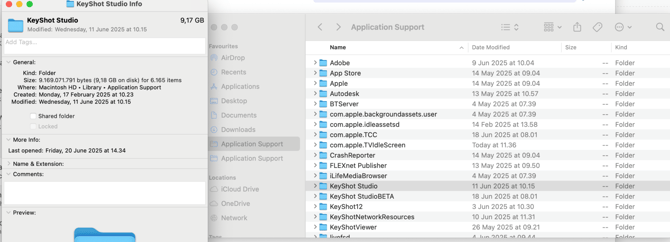
If you can go direct to your Macintosh HD, then you should be able to see the Library folder in there.
C. Reinstall KeyShot
Use the full installer (not an update installer) when performing fresh installs or full reinstalls.
-
Download and Re-install KeyShot using the links below.
- Go through the registration wizard, enter your license information, and KeyShot should be up and running.
- If activation requires a node‑locked license file, select “I have a node‑locked license file” during activation and load the .lic file.
Additional Information
macOS: Setting Resource folder permissions
- In Finder, browse to Macintosh HD > Library > Application Support.
- Right-click the KeyShot folder and select “Get Info”.
- Scroll to Sharing & Permissions and ensure all users listed have Read & Write access.
- If your username isn’t listed, click the + to add it and give Read & Write.
- Click the settings (gear) icon, choose “Apply to enclosed items”, and confirm.
- Close the Get Info window.
Troubleshooting notes for reinstall and activation
- If activation or sign-in errors occur after reinstalling, perform a fresh install using the full installer and ensure Resource folders were fully removed prior to reinstall.
- Deleting local KeyShot data folders and reinstalling with the full installer is a recommended step when KeyShot freezes, fails to activate, or shows SSO/SSL connect errors.